When every socket and ceiling light in a UK home suddenly cuts out, residents with a prepayment or smart meter face an immediate diagnostic puzzle: has the wider street electricity cable tripped, or has the meter’s internal contactor switch shut off because credit ran dry? Calling the wrong helpline wastes crucial hours, because retail energy suppliers manage billing and meter credit while regional Distribution Network Operators (DNOs) exclusively maintain underground cables and overhead lines.
1. Two-Minute Diagnosis: Street Grid Fault vs Meter Self-Disconnection
Before calling either your supplier or 105, inspect three physical clues safely using a torch or smartphone flashlight:
- Look at Streetlights and Neighbours: If adjacent properties and pavement streetlamps are also dark, you are experiencing a DNO network fault—check our live UK power cut map and call 105.
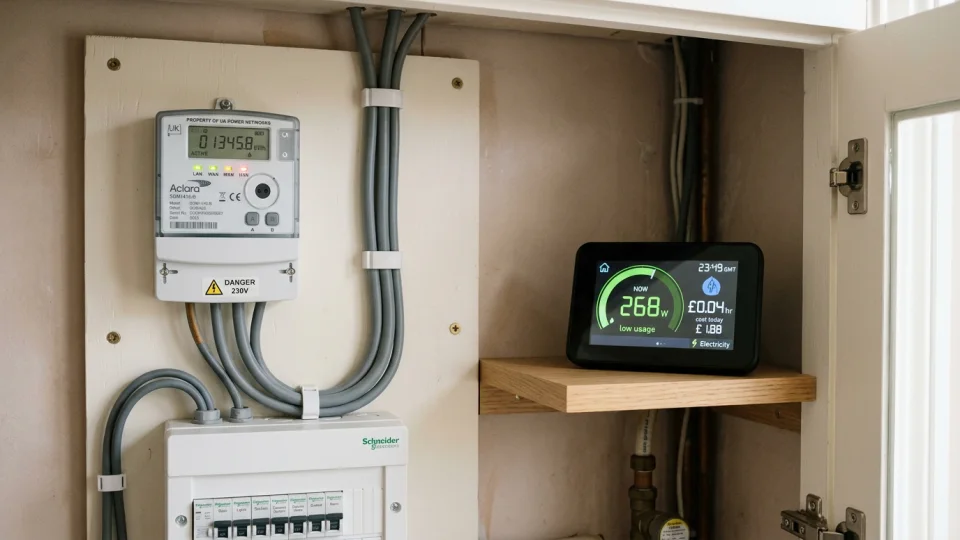
- Check Your Meter Screen and LED Indicators: On SMETS1 and SMETS2 smart electricity meters, a completely blank screen during daytime usually points to a loss of incoming mains voltage (DNO fault or blown main service fuse). If the LCD screen lights up and reads Supply Off, Credit £0.00 or Emergency Credit, power is reaching your house and the meter itself has opened its internal relay.
- Check Your Consumer Unit (Fuse Box): Verify that the main switch and RCD/RCBO breakers inside your home are all flipped up in the ON position.
2. How UK Prepayment Emergency Credit & Friendly Hours Work
Under Ofgem supply licence conditions, all licensed GB electricity and gas suppliers must offer safety buffers preventing abrupt disconnections during vulnerable periods:
| Protection Mechanism | How It Activates | Important Repayment Detail |
|---|---|---|
| Emergency Credit | Typically £5–£10 buffer accessed via button A/B on the meter keypad or In-Home Display when balance dips below £0.50–£1.00. | Must be repaid in full from your next top-up before normal supply resumes smoothly. |
| Friendly Credit (Non-Disconnection) Hours | Prevents supply cut-off overnight (often 4pm/6pm–10am), weekends and UK Bank Holidays even if balance hits zero. | Debt continues accruing daily standing charges plus energy used during friendly hours. |
| Additional Support Credit | Discretionary supplier top-up granted over the phone for households facing sudden hardship or top-up communication errors. | Usually recovered via an affordable weekly repayment plan rather than a single lump sum. |
3. Why SMETS2 Top-Ups Sometimes Fail to Restore Supply Immediately
Sometimes you top up online or at a PayPoint shop, yet the house stays dark. That usually happens because the national Smart Metering Wide Area Network (WAN) signal in a basement, stone cottage or rural valley fails to deliver the cryptographic token to your meter’s Communications Hub. Look at the WAN and HAN LEDs on top of your electricity meter:
- WAN flashing every few seconds: Indicates normal cellular/mesh network connection to the Data Communications Company (DCC).
- Rapid or absent WAN light: The meter cannot receive automatic remote credit. Ask your energy supplier immediately for the 20-digit UTRN (Unique Transaction Reference Number) to key directly into the meter buttons manually.
- After entering credit, check for “Press A/B to Connectâ€: For safety reasons—in case an iron or cooker ring was left switched on—many UK smart meters require you to press a physical confirmation button on the meter itself after topping up before re-energising circuits.
4. Financial Hardship & Extra Help Rights
If your home relies on medical equipment or contains elderly or disabled residents and cannot afford to clear accrued prepayment debt to restore heating, suppliers are restricted from leaving vulnerable people disconnected. Contact your supplier’s Priority Care team immediately, and if unresolved, escalate to the Citizens Advice Consumer Helpline or Extra Help Unit for same-day intervention.